Understand theory and applications of 3D
Applications of 3D:
There are a few things that are applications of 3D such as film, TV, animation, models, product design, web, games, education, and architectural walk-through. These are things that use 3D modelling and animating like in videogames modelling will be used on characters and enemies to create realistic looking human forms. They then are also animated, sometimes using motion capture on real people to make the game realistic. In films animating is used a lot of the time when making cartoon films. These are put together within a long period of time and are always pre-rendered which is why animated films look a lot more realistic and high quality than videogames. Below is a high quality model of a videogame enemy, the animation is high quality and smooth, this gives it a realistic feel although it isn't a real life thing. Higher amounts of polygons could improve animation quality and make the model look more realistic, but for 2004 this is impressive. Also below is an an image of a game which is showing the environment, an enemy and in-game props and objects. The world is put together very well. The only issue is that there isn't a lot going on. There could also be more models scattered around a bit. The environment however works pretty well.
There are a few things that are applications of 3D such as film, TV, animation, models, product design, web, games, education, and architectural walk-through. These are things that use 3D modelling and animating like in videogames modelling will be used on characters and enemies to create realistic looking human forms. They then are also animated, sometimes using motion capture on real people to make the game realistic. In films animating is used a lot of the time when making cartoon films. These are put together within a long period of time and are always pre-rendered which is why animated films look a lot more realistic and high quality than videogames. Below is a high quality model of a videogame enemy, the animation is high quality and smooth, this gives it a realistic feel although it isn't a real life thing. Higher amounts of polygons could improve animation quality and make the model look more realistic, but for 2004 this is impressive. Also below is an an image of a game which is showing the environment, an enemy and in-game props and objects. The world is put together very well. The only issue is that there isn't a lot going on. There could also be more models scattered around a bit. The environment however works pretty well.


Displaying 3D polygon animations:
There are a lot of programs which you can use for modelling such as Maya, 3DS Max, Milkshape 3D, Inventor and ZBrush. A lot of things are taken into account when modelling and animations such as: Application programming interface, eg Direct3D, OpenGL Graphics pipeline, for example modelling, lighting, viewing, projection, clipping, scan conversion, texturing and shading, and display. Rendering techniques (radiosity, ray tracing) Rendering engines, Distributed rendering techniques, Lighting, Textures Fogging, Shadowing Vertex and pixel shaders, Level of detail. These are all types of things that a 3D modeller takes into account when creating models. OpenGL and Direct3D are the best and most commonly used API (application programming interface) today in many different areas of computing.

Geometric theory:
When modelling/animating, the process of geometric theory is a way to model objects or characters. This is done through a design process using a mesh which gives the basic shape of an object to then be added onto and textured. The way a mesh is created is through a lot of combined polygons. Polygons are two dimensional shapes that all have three key components, these are vertices, an edge and a face. In the creation of a polygon two vertices are connected together by a line creating a first edge. When another vertices is added and two more line edges are connected it creates a basic triangle polygon with a face which is the simplest version of a polygon that can be made. Before this basic shape is created, extra vertices can be added after a third to create a shape called a quad which is composed of four edges. This can be carried on with more vertices to create more complex shapes such as hexagons and decagons. Below is a basic human face model, further along the line this will be finished and properly textured as long as there aren't too many polygons.
When modelling/animating, the process of geometric theory is a way to model objects or characters. This is done through a design process using a mesh which gives the basic shape of an object to then be added onto and textured. The way a mesh is created is through a lot of combined polygons. Polygons are two dimensional shapes that all have three key components, these are vertices, an edge and a face. In the creation of a polygon two vertices are connected together by a line creating a first edge. When another vertices is added and two more line edges are connected it creates a basic triangle polygon with a face which is the simplest version of a polygon that can be made. Before this basic shape is created, extra vertices can be added after a third to create a shape called a quad which is composed of four edges. This can be carried on with more vertices to create more complex shapes such as hexagons and decagons. Below is a basic human face model, further along the line this will be finished and properly textured as long as there aren't too many polygons.

Mesh construction:
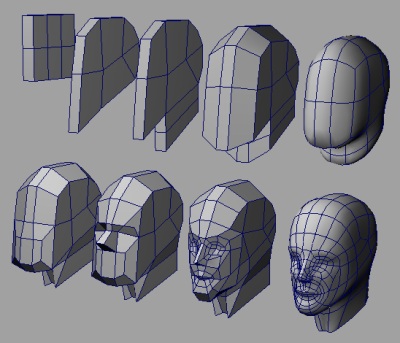
Mesh construction is different ways of creating models. These ways are box modelling, extrusion modelling, spline modelling and common primitives. There are also techniques such as lofting and lathing. Box modelling is when you take one big shape and form it into what is usually a rough draft of a model, you have to do a lot of extruding and scaling. Extrusion modelling (which is sometimes referred to as inflation modelling) is the method of modelling you create a 2D shape which traces the outline of a photograph or a drawing which you can then transform into a 3D shape, it is a very common method that people use and one of the easiest. Spline modelling is using spline shapes instead of normal shapes which is simple and also a popular way of modelling. Splines can be used in both 2D and 3D environments. Common primitives are very simple polygons which makes it easier to create a model, it is a good base for a model if you don't want to start from scratch. Lofting is a wire frame of a 3D object which is used as a technique in 3D modelling software, it's a way of modelling based on spines. Lathing is what you can do to 3D models by rotating points of a spline or other models on an axis. Below is an image of how box modelling works, as you can see, the model begins with just faces and ends with a lot of polygons as the model is stretched and edited. This can be common however people usually add a picture in the background of their modelling program so they can stretch out the model to the picture which helps create certain things.
Mesh construction is different ways of creating models. These ways are box modelling, extrusion modelling, spline modelling and common primitives. There are also techniques such as lofting and lathing. Box modelling is when you take one big shape and form it into what is usually a rough draft of a model, you have to do a lot of extruding and scaling. Extrusion modelling (which is sometimes referred to as inflation modelling) is the method of modelling you create a 2D shape which traces the outline of a photograph or a drawing which you can then transform into a 3D shape, it is a very common method that people use and one of the easiest. Spline modelling is using spline shapes instead of normal shapes which is simple and also a popular way of modelling. Splines can be used in both 2D and 3D environments. Common primitives are very simple polygons which makes it easier to create a model, it is a good base for a model if you don't want to start from scratch. Lofting is a wire frame of a 3D object which is used as a technique in 3D modelling software, it's a way of modelling based on spines. Lathing is what you can do to 3D models by rotating points of a spline or other models on an axis. Below is an image of how box modelling works, as you can see, the model begins with just faces and ends with a lot of polygons as the model is stretched and edited. This can be common however people usually add a picture in the background of their modelling program so they can stretch out the model to the picture which helps create certain things.
3D development software:
There are a lot of 3D development software, for example: 3DS Max, Maya, Lightwave, AutoCAD, Cinema 4D, MilkShape 3D and Inventor. Some of the file formats used for these programs are 3ds, .mb, .lwo, .C4d, and there are also some plug-ins. This software is essential for modelling for anything ever. Some of it is free but cannot do as much as the programs you must pay for. A good extended example of 3D development software is Autodesk 3DS Max which is a professional quality modelling program which is used by both videogame companies and videogame modders.
There are a lot of 3D development software, for example: 3DS Max, Maya, Lightwave, AutoCAD, Cinema 4D, MilkShape 3D and Inventor. Some of the file formats used for these programs are 3ds, .mb, .lwo, .C4d, and there are also some plug-ins. This software is essential for modelling for anything ever. Some of it is free but cannot do as much as the programs you must pay for. A good extended example of 3D development software is Autodesk 3DS Max which is a professional quality modelling program which is used by both videogame companies and videogame modders.

Constraints:
There are three different constraints. The first is Polygon count. Polygons are individual shapes put together to create a model, the more polygons you have the higher quality the model looks, however if you have too many polygons it may be a bad thing as it may slow down a game if you put that model into it. The next constraint is File size. Knowing the file size of things is important, you don't want to have too many things with big file sizes else you might get low hard drive space and your pc will perform slower. File sizes can range from 1 kilobyte to 1 terabyte, but it is highly unlikely for a model to be a gigabyte or so, maybe a megabyte instead. Animation may take up more space than modelling. The last constraint is rendering time. This is how long your animation may take to render, this depends on the length of animation, the amount of frames and how detailed the model is. It can take from a few seconds to a few hours. Things like Disney films most likely take a long time to render their animations but they probably have very good computers that can handle it. Rendering can also be done with other things like videos that you may upload to YouTube, you might first put that video into video editing software which you can then mess around with then save again, when it saves that is what rendering is. Shown below is an image with a very high polygon count, the higher number of polygons mean that that the character animation will be a lot smoother and more fluid however too many polygons would mean that it may slow down your system. As technology further develops over the years the amount of polygons you can have in a model will increase drastically.

There are three different constraints. The first is Polygon count. Polygons are individual shapes put together to create a model, the more polygons you have the higher quality the model looks, however if you have too many polygons it may be a bad thing as it may slow down a game if you put that model into it. The next constraint is File size. Knowing the file size of things is important, you don't want to have too many things with big file sizes else you might get low hard drive space and your pc will perform slower. File sizes can range from 1 kilobyte to 1 terabyte, but it is highly unlikely for a model to be a gigabyte or so, maybe a megabyte instead. Animation may take up more space than modelling. The last constraint is rendering time. This is how long your animation may take to render, this depends on the length of animation, the amount of frames and how detailed the model is. It can take from a few seconds to a few hours. Things like Disney films most likely take a long time to render their animations but they probably have very good computers that can handle it. Rendering can also be done with other things like videos that you may upload to YouTube, you might first put that video into video editing software which you can then mess around with then save again, when it saves that is what rendering is. Shown below is an image with a very high polygon count, the higher number of polygons mean that that the character animation will be a lot smoother and more fluid however too many polygons would mean that it may slow down your system. As technology further develops over the years the amount of polygons you can have in a model will increase drastically.


No comments:
Post a Comment